 Skip to content

If you want to build a killer app, you need to know how to classify software applications components. This isn’t just nerdy talk for engineers in a basement. It is the secret sauce for making software that actually works and lasts. When you break things down right, your life as a developer gets way easier. You can fix bugs faster and add cool features without breaking the whole system. This guide will show you exactly how to organize your code like a pro.
Understanding Software Application Components
Software applications are like big puzzles made of many small pieces. These pieces are called application components. Each part has a specific job to do within the software architecture. Think of them as the building blocks that make everything run smoothly. When these blocks fit together well, the whole system stays strong and healthy.
These components help manage the system complexity that comes with big projects. Engineers use them to create a clear structural organization. By focusing on software engineering principles, you can make sure every part is in its right place. This makes the software development process feel much less like a headache. Here are some of the most common pieces you will see in the wild:
- User Interface (UI): This is what the user sees and clicks on every day.
- Business Logic: This part handles the rules and does all the heavy lifting.
- Database Management: This is where all your important data lives and stays safe.
- APIs: These are the bridges that let different programs talk to each other.
- Security Modules: These parts keep the bad guys out of your system.
The Strategic Importance of Component Classification
Knowing how to classify software applications components is a total game changer for your team. It helps you keep track of your software modules throughout the entire software lifecycle. Without a plan, your code becomes a messy bowl of spaghetti. Classification brings order to the chaos and helps reduce technical debt over time. It is all about making your work more efficient and your software quality much higher.
Enhanced Maintenance
Good classification makes the maintenance phases of your project a breeze. When something breaks, you know exactly which subsystem to check. You don’t have to hunt through thousands of lines of source code. This saves tons of time and keeps the system reliability high. It makes fixing bugs feel like a quick win instead of a long nightmare.
Maximizing Reusability
Why build the same thing twice if you don’t have to? Reusability is a huge benefit of component-based development. When you classify parts well, you can use them in other software systems. This speeds up application development for your next big project. It is like having a box of Lego sets that you can mix and match.
Clarity in Documentation
Clean documentation is the hallmark of great software engineering. Classifying components makes it easy to write guides for other developers. It explains how the different functional elements work together. When a new person joins the team, they can understand the system design quickly. This keeps everyone on the same page from day one.
Streamlined Collaboration
Big apps are built by teams, not just one person. Classification helps divide the work into clear partitioning. One group can work on the data management while another focuses on the UI. This reduces friction and makes the whole software evolution process much smoother. It is all about playing your position on the team.
Efficient Scalability
As your app grows, you need it to handle more users. Proper classification makes scalability much easier to achieve. You can upgrade one part of the software architecture without touching the rest. This modularity is key for apps that want to go big. It allows your system to grow as fast as your dreams.
Primary Dimensions of Software Classification
There are a few different ways to look at your app. You can group things by what they do or where they live. Using numerical taxonomy or clustering techniques can help you find patterns. Most pros use a mix of these methods to get the best results. Let’s break down the main ways to organize your digital world.
Classification Based on Functionality

This is the most common way to group your software modules. You look at the job each part is doing for the user. It helps ensure high cohesion within each layer of the system. This makes the code easier to read and follow for everyone.
- Presentation Layer (UI/UX): This handles all the visuals and user interactions.
- Business Logic Layer: This is the core engine that processes all the data.
- Data Layer: This part is all about storage and keeping records organized.
Classification Based on Deployment Environment
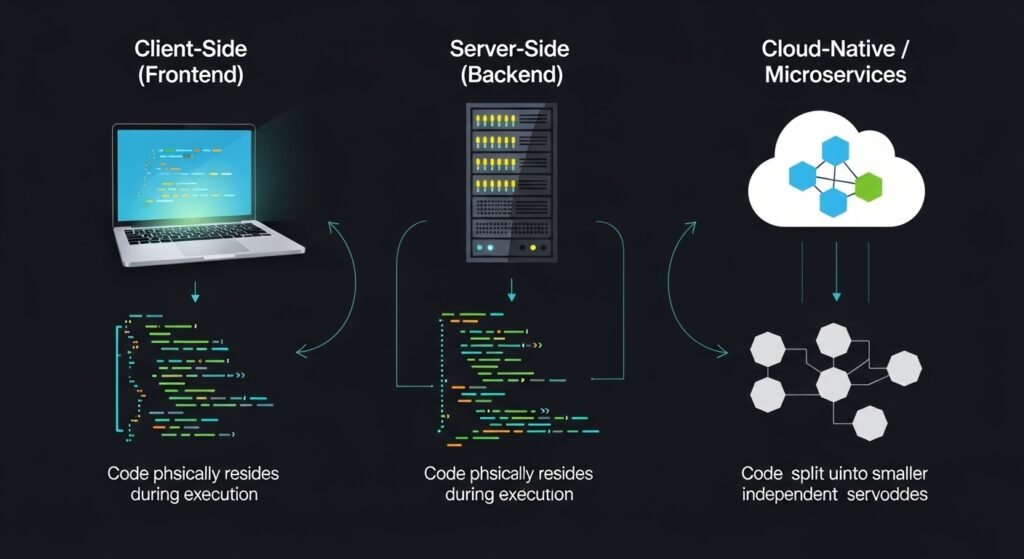
Sometimes you need to know where the code is actually running. This helps with system integration and performance tuning. It tells you if the work is happening on a phone or a big server.
- Client-Side Components: These run directly on the user’s computer or browser.
- Server-Side Components: These live on remote hardware and handle the heavy requests.
- Cloud-Native Components: These use modern microservices and serverless tech in the cloud.
Classification Based on Reusability and Scope
Not every piece of code is meant to be used everywhere. Some are special, while others are like basic tools. Understanding this helps with dependency management and abstraction.
- Reusable/Shared Components: These are tools like login or logging that work in many apps.
- Non-Reusable Components: These are custom parts built for one specific feature.
Classification Based on the Technology Stack
You can also group things by the languages or tools used to build them. This is great for assigning tasks to specific engineers. It keeps your technical stack organized and easy to manage.
- Frontend Components: Built with stuff like HTML, CSS, and React.
- Backend Components: Created using Python, Java, or Node.js.
- Middleware Components: The hidden parts that help the front and back talk.
Technical Deep Dive into Core Component Types
To really master how to classify software applications components, you have to look closer. Each type of component has its own set of rules and best practices. You want to aim for low coupling between these different sections. This makes sure that changing one part won’t blow up the whole app. Let’s dig into the details of these essential parts.
User Interface (UI) Components
The UI is the face of your application. It includes everything the user touches, like buttons and menus. Good UI components should be easy to use and look great on any screen. Developers spend a lot of time on these because they represent the brand.
- Visual Elements: Things like forms, sliders, and navigation bars.
- User Experience: Making sure the flow feels natural and helpful.
- Responsiveness: Ensuring the app works on both phones and big monitors.
Business Logic Components
This is where the real magic happens in computer science. These components take input and turn it into something useful. They are the brains of the whole operation. You want this code to be super clean and very fast.
- Rule Processing: Applying the specific logic that makes your app unique.
- Data Transformation: Changing raw info into something users can understand.
- Calculations: Handling all the math and heavy lifting behind the scenes.
Data Management and Storage Components
Every app needs to remember things. These components handle the connection to your databases. They make sure your info is safe and can be found quickly. Without good data management, your app would be pretty useless.
- SQL Databases: Great for structured data that needs to stay very organized.
- NoSQL Databases: Perfect for flexible data that changes a lot.
- Caching: Using things like Redis to make the app feel lightning fast.
Integration and Communication Components

Modern apps almost never work alone. They need to talk to other services like Stripe or Google Maps. Integration components handle these external relationships. They use interfaces to make sure the data flows correctly.
- API Management: Handling the requests going out and coming in.
- Webhooks: Getting real-time updates from other programs.
- Error Handling: Making sure the app doesn’t crash if an outside service fails.
Security and Identity Components
Security is a huge deal in software engineering today. These parts protect user data and verify who is using the app. They use encapsulation to hide sensitive details from the rest of the system. Keeping this part strong is your number one priority.
- Authentication: Checking if users are who they say they are.
- Authorization: Deciding what each user is allowed to do or see.
- Encryption: Scrambling data so hackers can’t read it even if they steal it.
Step-by-Step Framework for Component Classification
Ready to start organizing? Follow these steps to learn how to classify software applications components like an expert. This process will help you clean up legacy systems or start a new project right. It takes a little time upfront, but it pays off big later.
- Initial Identification: List every single part of your app, even the hidden ones.
- Defining Purpose: Figure out the main goal of every piece of code you found.
- Mapping Deployment: Decide if the part belongs on the client, server, or cloud.
- Assessing Portability: Check if the module is generic enough to use in another app.
- Technical Categorization: Label everything by the language or framework it uses.
- Formal Documentation: Draw a map or a chart so everyone can see the structure.
Practical Implementation and Best Practices
To get the most out of your architectural design, you should follow some industry standards. These tips will keep your project on track and prevent big messes. It is all about working smarter, not harder.
- Starting with Core Functions: Build the most important parts first before adding fluff.
- Adopting a Layered Architecture: Keep your visuals, logic, and data in separate buckets.
- Cross-Functional Involvement: Get input from testers and DevOps folks early on.
- Iterative Review: Check your classification every few months to make sure it still works.
Case Study: Component Classification in E-Commerce
Let’s look at a real-world example of an online store. This helps show how to classify software applications components in a way that makes sense. An e-commerce app is complex, so it needs a solid plan.
- UI Layer: This handles the product pages, search bars, and the checkout cart.
- Logic Layer: This calculates discounts, taxes, and shipping costs on the fly.
- Data Layer: This stores your customer names, their past orders, and current stock.
- Integration Layer: This talks to the bank to process payments and tracks your packages.
Overcoming Challenges in Component Classification
Organizing software isn’t always easy. You will run into some bumps along the road. The key is to stay flexible and keep learning. Don’t let a little complexity stop you from building something great.
- Managing Complexity: Break big problems into tiny, manageable pieces.
- Functional Overlap: Try to avoid parts that do too many different things at once.
- Lifecycle Evolution: Be ready to change your classification as your code grows and changes.
Essential Tools for Classification and Visualization

You don’t have to do this all by hand. There are cool tools that help you see your software structure clearly. These make it easy to share your ideas with the rest of the team.
- Unified Modeling Language (UML): A standard way to draw diagrams of your system.
- Diagramming Software: Tools like Lucidchart or Draw.io are great for visual learners.
- Static Analysis Tools: Programs like SonarQube can find hidden links in your code.
Conclusion and Future Outlook
Learning how to classify software applications components is a skill that will serve you forever. It makes you a better engineer and a more valuable team member. As we move toward more microservices, these skills will only become more important. Keep your code clean, keep your components organized, and you will build amazing things. Now, get out there and start architectural design like a boss.
FAQs on Software Component Classification
What is the difference between a software component and a software module?
A module is a functional unit of code usually at the development level, while a component is a higher-level, replaceable, and executable piece of a system. Components often contain multiple modules and have a well-defined interface for interaction within a larger architecture.
How does the SOLID principle affect component classification?
The SOLID principles, particularly the Single Responsibility Principle, dictate that a component should be classified based on one primary function. This ensures that the classification remains clean and that the component does not become a “God Object” that is impossible to categorize or maintain.
What role does the “Interface” play in classifying components?
Interfaces are the contracts that define how components talk to each other. When classifying, the interface helps determine if a component belongs in the Integration Layer or the Service Layer based on the types of data and commands it accepts.
Can a component belong to two different categories at once?
While it is possible for a component to have overlapping duties, best practices suggest refactoring such components. If a component is both a UI element and a Data handler, it indicates high coupling, which should be broken down into two distinct classifications for better stability.
How do microservices change the way we classify software parts?
In microservices, each service is essentially its own classified component. Classification shifts from looking at layers within one big program to looking at how independent, network-connected services interact across a distributed system.
What is the “Common Closure Principle” in component design?
This principle states that components should be classified and grouped together if they change for the same reasons and at the same times. It helps in organizing components so that a single requirement change doesn’t force updates across every different category.
How do you classify “Utility” components?
Utility components are usually classified as “Cross-Cutting Concerns.” These are parts like encryption tools or string manipulators that don’t fit into just the UI or Data layers but provide essential services to all other classified layers.
What is the impact of classification on the software testing phase?
Classification allows for “Unit Testing” within specific categories. For example, by classifying a group as “Data Management,” testers can focus specifically on database triggers and storage integrity without worrying about the visual UI bugs.
How does “Encapsulation” relate to component categories?
Encapsulation ensures that the internal workings of a classified component are hidden. When you classify a component, you are essentially defining what is “public” (the interface) and what is “private” (the internal logic), which keeps the system organized.
What are “Legacy” components in a classification map?
Legacy components are older parts of the system that may not follow modern classification rules. They are often categorized as “Black Box” components—parts we know the input and output of, but whose internal structure is too messy to reclassify without a full rewrite.
How do “Event-Driven” components differ from “Request-Response” components?
Event-driven components are classified by their ability to react to triggers or “events” (like a user clicking a button or a timer going off), whereas request-response components are classified by their active role in asking for and receiving data.
Is there a standard naming convention for software components?
While it varies by team, a common standard is to name them based on their classification and function, such as PaymentProcessor_Logic or UserLogin_UI. This makes the classification obvious just by looking at the file name.
What is the “Acyclic Dependencies Principle”?
This principle suggests that the dependency graph between classified components should have no cycles. You should never have Component A depend on Component B, while Component B also depends on Component A.
How do you classify third-party libraries within your own architecture?
Third-party libraries are typically classified as “External Dependencies.” They are usually wrapped in an internal component (a “Wrapper” or “Adapter”) so that if the library changes, you only have to update one part of your classification map.
How does classification help with “Hot-Swapping” code?
If components are classified and decoupled correctly, you can perform “Hot-Swapping,” which means replacing a “Data Storage” component with a newer version while the rest of the application (like the UI and Logic) keeps running without a restart.
What is a “Composite Component”?
A composite component is a high-level category that contains several smaller, sub-classified components. For example, a “Search Feature” might be a composite component containing a UI bar, a search algorithm, and a database query module.
How does “State Management” affect component classification?
Components are often classified as “Stateful” (they remember data over time) or “Stateless” (they perform a task and forget everything). Stateless components are much easier to scale in cloud environments.
What is the “Stable Dependencies Principle”?
This rule states that components should depend in the direction of stability. Highly classified, stable components (like core business rules) should not depend on volatile, frequently changing components (like specific UI themes).
How do you classify “Middleware” in a modern stack?
Middleware is classified as a “Broker” or “Interceptor.” Its job is to sit between the Client and the Server components to perform tasks like logging, authentication, or data compression before the main logic takes over.
Can classification help in calculating technical debt?
Yes. By looking at a classification map, you can identify “Spaghetti” areas where components are crossing category lines. These areas represent high technical debt and should be the first targets for refactoring.