 Skip to content

The search world is changing fast with new AI tools everywhere. You might wonder if your analytics can keep up with these changes. Many site owners ask one big question lately. Does GA4 show Google AI mode as a referrer when people visit your site? Understanding this is key to your digital marketing success today.
The Evolution of Search: Does GA4 Show Google AI Mode as a Referrer?
The current reality is a bit frustrating for data-driven marketers. If you are looking for a simple label in your reports, the quick answer is no. Right now, Google Analytics 4 (GA4) does not display “Google AI Mode” or “AI Overviews” as a distinct, labeled referrer in your standard dashboards.
The “Bug” Perspective
Google has actually addressed this missing data. They have indicated that the lack of a specific label for AI Mode referrals is essentially a known limitation or a “bug” that they are actively working to resolve. Marketers can likely expect a separate label for these referrals in future GA4 updates.
Current Classification
Because there is no dedicated label yet, traffic coming from Google’s AI-generated results is “hidden” within other categories:
- Organic Search: Most AI-driven traffic is currently bundled into this category if GA4 can still link the session to a Google search query.
- Direct Traffic: If the referral data is completely stripped during the transition from the AI summary to your site, it often gets labeled as direct traffic.
Technical Barriers
There is a specific technical reason why this happens. Links within Google AI Mode results often use a “non-referrer” attribute. This attribute veils the source data, making it impossible for GA4 to distinguish a click coming from an AI summary versus a traditional search link.
The Impact of AI-Driven Search on Modern Marketers
The introduction of AI into search is forcing a major shift from traditional SEO to GEO, or Generative Engine Optimization. This evolution creates several hurdles for modern marketing teams.
The Attribution Crisis
Marketers currently face a significant challenge in determining the exact origin of their visitors. Without clear labels, you cannot accurately tell if a user clicked on a traditional “blue link” or was inspired by an AI-generated summary. This makes it difficult to know which parts of your content strategy are actually driving results.
Strategy and ROI Complications
- Difficulty in Measurement: It is hard to prove the ROI of specific GEO tactics when the data is buried in broader categories.
- Data Dilution: Important shifts in how users behave—like moving from search engines to answer engines—are hidden, making it harder to spot new trends.
- Underreporting Value: You might be undervaluing high-quality content that AI models use to provide answers if you can’t track the resulting clicks.
How to Monitor and Identify AI Traffic in Google Analytics 4
You do not have to wait for Google to fix the system. You can take a proactive approach to find this hidden traffic. Manually setting up your GA4 is the best way to stay ahead. This helps you capture the start of the AI-referral era.
You should start by identifying the common domains used by AI. Many different platforms now send traffic to websites every day. Keeping a list of these domains helps you filter your reports. Here are some key domains you should watch for:
- chatgpt.com is the main source for OpenAI users.
- perplexity.ai is a popular search-focused AI engine.
- gemini.google.com is Google’s own AI chat interface.
- copilot.microsoft.com handles traffic from the Microsoft AI tool.
Leveraging the Traffic Acquisition Report
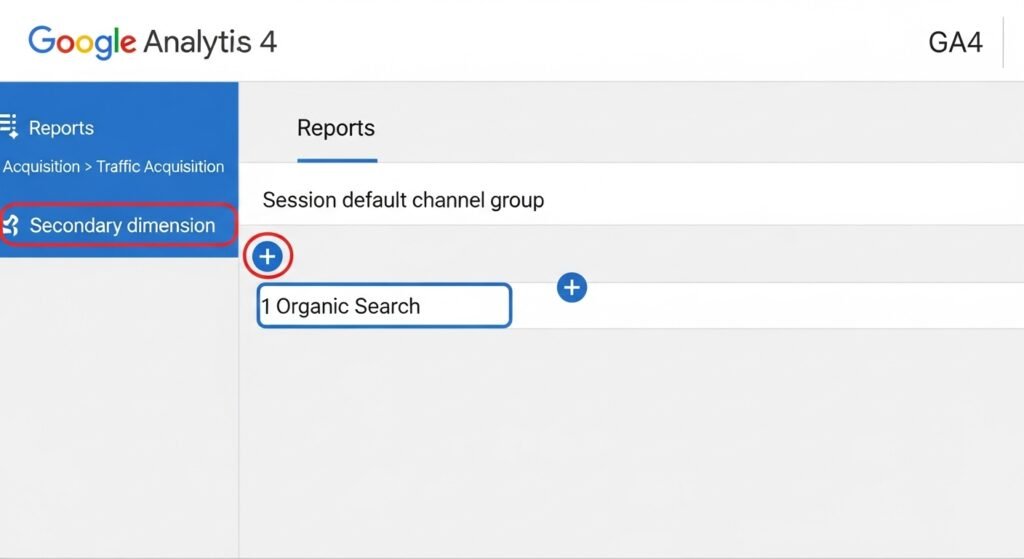
You can find a lot of clues in your standard reports. The Traffic Acquisition report is the best place to start looking. Go to the Reports section and click on Acquisition to find it. This report shows how people first found your website.
Once you are there, you need to dig a little deeper. Add a secondary dimension called session source/medium to the main table. This breaks down the broad categories into specific website names. You will start to see the AI domains mentioned earlier.
This view gives you a much better level of data granularity. You can compare how much traffic comes from ChatGPT versus Perplexity. Even if Google AI Mode is missing, other AI sources show up. This helps you see which AI tools like your content.
Using Regex Filters for Scalable Tracking
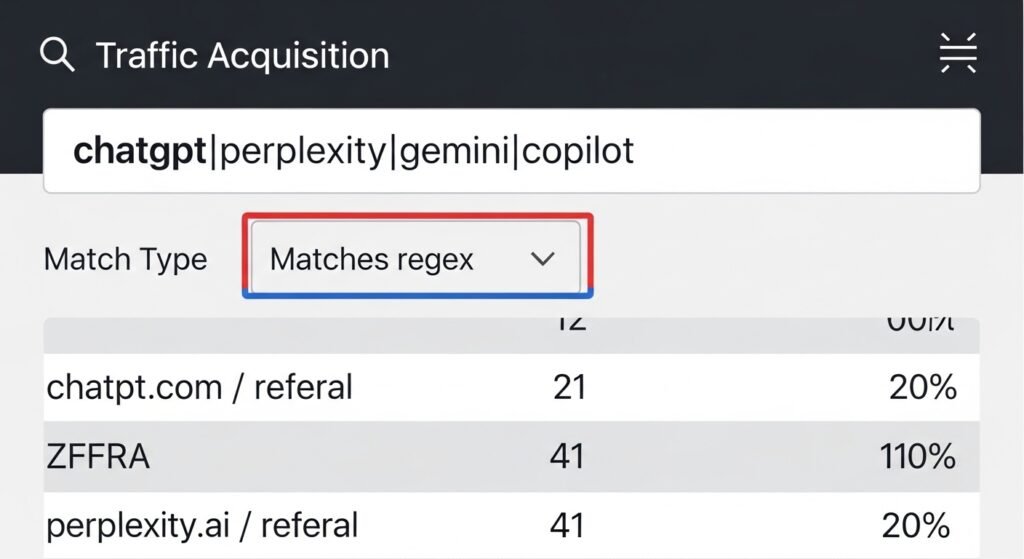
If you have a lot of traffic, checking one by one is slow. You can use Regular Expressions or Regex to speed things up. Regex lets you search for many different AI sources at once. It is a powerful way to isolate your AI traffic.
You can apply these filters directly in the GA4 search bar. This creates a clean view that only shows AI-related visits. It saves you time when you need to make quick reports. You can see your total AI reach in just seconds.
Using advanced Regex strings is the smartest way to do this. You can write a string that includes all major AI players. This ensures you do not miss any small AI subdomains. It keeps your data reporting very accurate and complete.
Establishing Custom Channel Grouping for AI Traffic
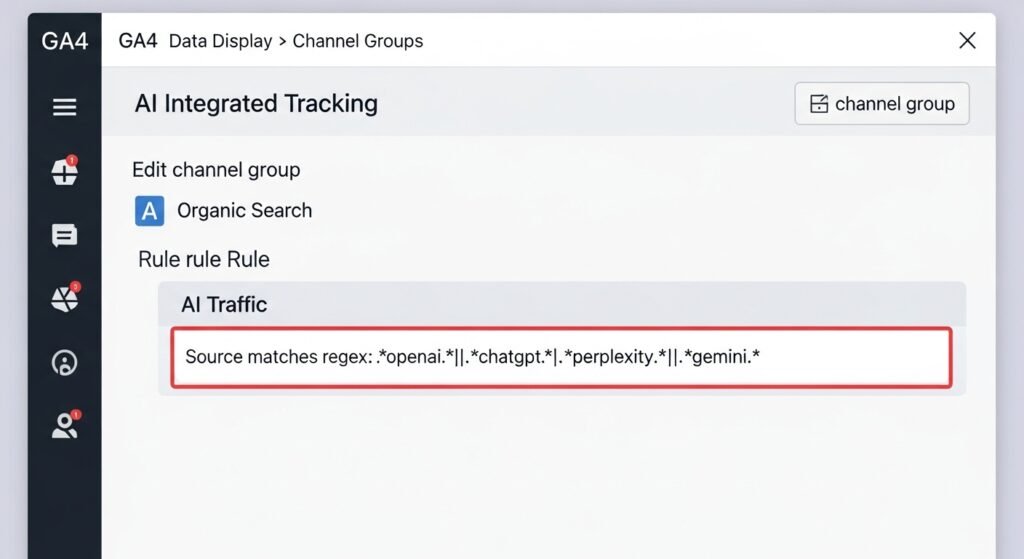
Creating a dedicated AI Traffic channel is a great long-term plan. This puts all your AI data into one neat bucket. It makes your high-level reports much easier for bosses to read. You won’t have to explain the hidden organic data anymore.
Setting this up is easy if you follow the right steps. Go to the Admin section and look for Data Display settings. Click on Channel Groups to start making your custom rules. You should always copy the default group first to stay safe.
- Access Admin settings in the bottom left of your screen.
- Copy Default channel groups so you have a backup.
- Define Conditions using the AI domains you want to track.
- Name Channel as AI Traffic so it is easy to find.
The order of your channels is very important in GA4. You must place the AI Traffic group at the top. This ensures GA4 checks for AI sources before anything else. If it is too low, the traffic stays in Referral.
Strategic Use of UTM Parameters
You can also use manual tagging to track your AI links. Adding UTM codes to your links gives you total control. This is great for links you share in AI prompts. It ensures the data goes exactly where you want it.
Consistency is the secret to good UTM tracking for AI. Always use the same names for your sources and mediums. For example, always use “gemini” as the source for Google AI. This keeps your reports clean and very easy to group.
- utm_source=gemini identifies the specific AI platform.
- utm_medium=ai_search labels the type of traffic.
- utm_campaign=brand_awareness tracks your specific goals.
The Future of AI Attribution in Google Analytics
We are all waiting for better updates from the Google team. Everyone expects a dedicated label for AI Overviews very soon. This will finally answer the question of where users come from. It will change how we look at search data forever.
You should prepare for these changes now by staying organized. Keep your manual tracking running so you have old data. This helps you compare the past with the future updates. You will have a clear picture of your growth over time.
Google Search Console might also help bridge this big data gap. GSC often shows data that GA4 might miss at first. It can show you how many people see your site in AI. Using both tools together gives you the best insights.
Best Practices for Generative Engine Optimization (GEO)
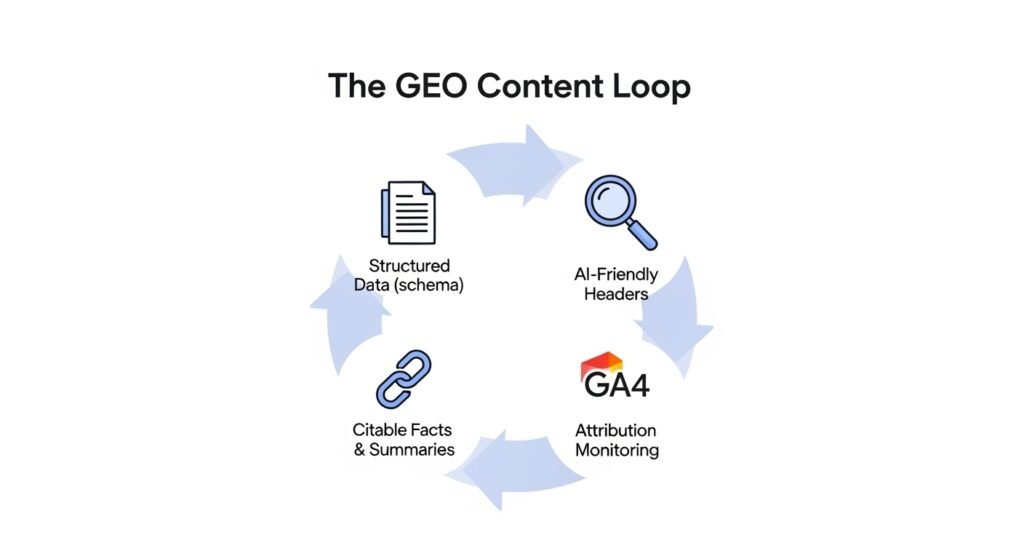
Optimizing for AI visibility is different than old-school SEO. AI models love content that is very easy to parse. Using structured data helps the AI understand your main points. Clear headings and short summaries are also big winners here.
- Use Structured Data to give AI robots clear facts.
- Write Summaries at the start of your long articles.
- Organize Content with clear H2 and H3 headings.
- Answer Questions directly to get featured in AI snippets.
You need to monitor your source of truth very carefully. Don’t just rely on one tool to tell the whole story. Balance your GA4 data with other third-party analytics tools. This gives you a 360-degree view of your user journey.
The search landscape is moving faster than ever before. Staying agile is the only way to keep your rankings high. Read the official Google documentation every month for new tips. This helps you adapt to any new AI search features.
Conclusion and Strategic Takeaways
Tracking AI traffic is a bit of a DIY project right now. You have to set things up yourself to get good data. But doing this work pays off by giving you better insights. You will see things your competitors are completely missing.
We are moving into the era of the Answer Engine. Traditional search metrics are just one part of the big story. Understanding how AI refers users is the new gold standard. It helps you build a website that thrives in the future.
You should take action today to safeguard your website data. Set up your custom channel groups and start using Regex. This prepares your business for an AI-centric web environment. You will be ready when Google finally updates the system.
FAQs
What happens if a user navigates from an AI summary to a page not cited in the summary?
If a user reads an AI summary and then manually searches for your brand or types your URL, GA4 attributes this as Direct or Organic Search. This “assisted discovery” is hard to track because the link between the AI interaction and the visit is broken.
Can I see which specific questions users asked to find my site via AI?
Standard GA4 does not provide the specific prompt or question. Unlike traditional keywords in Search Console, AI interactions are synthesized. You can only see the landing page to infer what topic the user was likely inquiring about.
Does AI traffic affect my site’s Engagement Rate differently?
Users coming from AI sources often have a higher Engagement Rate. Since they have already received a summary, clicking through typically indicates a deep interest in details, often leading to longer session durations compared to standard searchers.
How does “Zero-Click” search impact my GA4 data?
Zero-click searches—where users get their answer entirely from the AI Overview—do not show up in GA4 at all. Since no click occurs, no session is recorded. This can make your total brand reach seem lower than it actually is.
Is there a way to exclude AI bots from my human traffic reports?
Yes. Use a filter in an Exploration Report to exclude known AI user agents. However, GA4 already attempts to filter out known “bad” bots automatically; AI referrers tracked here are actual human users clicking links within an AI interface.
Will “AI Traffic” show up in my real-time reports?
If you have created a Custom Channel Group, it will not immediately appear in the Real-time dashboard’s default cards. You must look at the “Source” or “Page Title” cards in Real-time to see incoming hits from AI domains.
How do I track AI traffic in Looker Studio?
Connect your GA4 property to Looker Studio and use a “Calculated Field.” Use a CASE statement to group sources like chatgpt.com and perplexity.ai into a new dimension called “AI Sources” for better visualization.
Does FAQ Schema still help if Google doesn’t show my FAQ snippets?
Yes. While Google limited FAQ rich results for many sites, AI models (like Gemini and ChatGPT) still heavily rely on FAQ Schema to understand and extract concise answers for their summaries.
Why do some AI visits show as “Unassigned” in GA4?
Traffic becomes Unassigned if GA4 receives a source (like chatgpt.com) but cannot determine the medium. This often happens when a referrer is passed without any UTM parameters to help GA4 categorize it.
Can I track conversions specifically from AI traffic?
Yes. In the Traffic Acquisition report, filter for your AI sources and look at the “Key Events” (conversions) column. This tells you if AI-referred users are actually signing up or buying products.
Does “rel=nofollow” on an AI link prevent tracking?
No. A nofollow attribute only tells search engines not to pass “link juice” for SEO. It does not stop GA4 from seeing the referrer data when a human clicks the link.
How do I find “SearchGPT” traffic specifically?
SearchGPT traffic typically appears with the source chatgpt.com. Because it is an integrated search feature, it may eventually carry specific UTM parameters added by OpenAI automatically.
Is it possible to see which AI model (e.g., GPT-4 vs GPT-3.5) sent the user?
Currently, no. Referral data only shows the domain (e.g., openai.com), not the specific model version used by the visitor.
Does Google Search Console show AI Overview impressions?
Yes, Google has confirmed that impressions and clicks from AI Overviews are included in the Search Console Performance report, though they are not yet separated from standard organic search results.
What is the difference between SEO and GEO?
SEO focuses on ranking in the list of blue links. GEO (Generative Engine Optimization) focuses on being the cited source within an AI-generated answer. GEO prioritizes authoritative citations and scannable facts.
Does using a CDN like Cloudflare hide AI referrer data?
Generally, no. A CDN delivers your content but doesn’t usually strip the Referer header from a user’s browser unless specifically configured to do so.
Can I use GTM to better track AI referrals?
Yes. You can create a User-Defined Variable in Google Tag Manager that looks at the {{Referrer}}. If it contains “ai” or “chat,” you can fire a custom event called ai_referral_visit for easier tracking in GA4.
Why does my “Direct” traffic spike when I get featured in an AI Overview?
This happens if the AI interface uses a strict Security Policy that strips the referrer header. The user arrives at your site with no “source” information, so GA4 defaults to Direct.
Are there specific “AI Browsers” I should watch for?
Watch for traffic from the Perplexity or Arc browsers. These browsers have built-in AI that summarizes pages and can change how referral data is passed to your site.
Does “AI Mode” traffic include voice search?
Yes. If a user gets an answer via Google Assistant or a voice-activated Gemini prompt and then clicks a link sent to their phone, it is considered part of the same AI-driven ecosystem.