 Skip to content

Managing today’s massive virtual environments is tough. Applications don’t live on just one server anymore; they are distributed apps that run across multiple virtual machines (VMs) and cloud environments. Knowing what’s connected to what—that’s the real challenge. This is where vRealize Infrastructure Navigator (VIN) comes into play. It gave IT teams the VM-level visibility they desperately needed to understand how their infrastructure supported their applications. This simple tool was a game-changer for migration planning and security long before the cloud became king.
Introduction to vRealize Infrastructure Navigator (VIN)
VIN is often called VMware’s application mapping tool. It is technically a plugin that works closely with vRealize Operations Manager (vROps). Its main job is to automatically discover applications running on virtual machines (VMs) and map their dependencies in real-time. Think of it as a blueprint generator for your virtual data center.
VIN provides a clear, visual representation of how application components and workloads interact within a vSphere environment. This gives IT instant insight into the relationships between VMs, applications, and services. Essentially, it answers the fundamental question: “What is depending on this server?”. VIN’s ideas established the foundation for modern application management tools today.
Context of Modern IT Challenges
Modern infrastructure is complex, dynamic, and often a mix of hybrid clouds and on-premises data centers. The complexity isn’t the hardware itself, but the services, applications, and users connecting across these environments.
The core challenge VIN solved was the lack of reliable, automated application dependency mapping. Without VIN, teams had to rely on manual inventories or best guesses, which led to high outage risk and long troubleshooting times during a production incident. For businesses trying to secure these ecosystems, the key question is, “Do we know what’s happening inside the infrastructure we’re securing?”. VIN offered an answer.
Status and End-of-Life (EOL)
It’s important to know that vRealize Infrastructure Navigator has reached its End-of-Life (EOL). VMware formally ended support for VIN in September 2017. This means VIN is not supported in recent vSphere releases (7.x and above).
However, the principles and concepts behind VIN remain highly relevant. Many organizations still work with legacy systems or are actively transitioning to modern observability solutions. For users still running VIN, VMware strongly encourages migration to newer technologies like VMware Aria Operations. Understanding VIN’s role is key to appreciating the capabilities of current APM tools.
Core Features and Technical Functionality of VIN
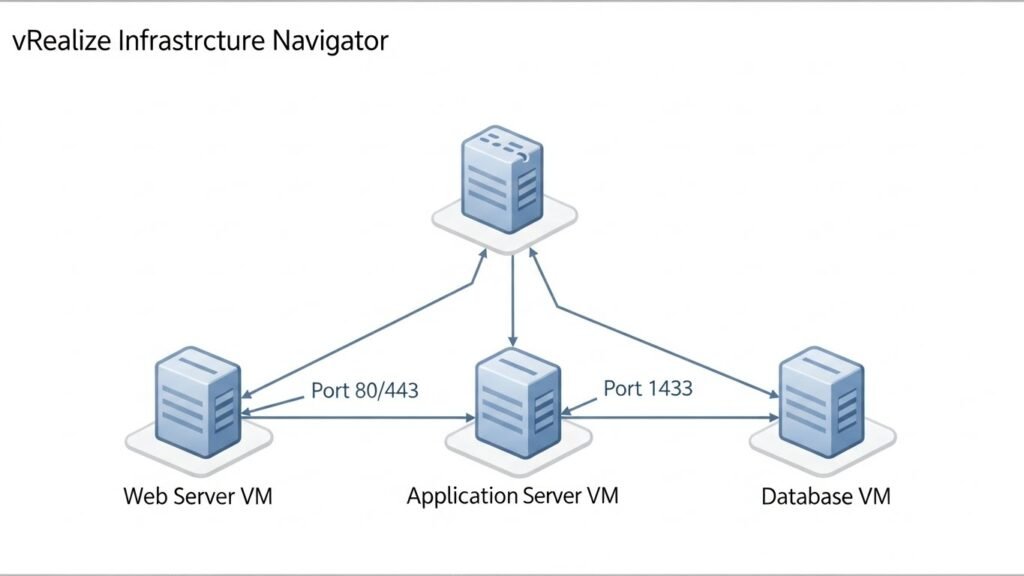
vRealize Infrastructure Navigator delivered several powerful features that simplified the lives of virtualization administrators. Its technical mechanics focused on visibility and simplicity. These features were designed to be effective out-of-the-box.
Discovery Mechanism: The Agentless Approach
VIN distinguished itself by using an agentless method for discovery. Unlike some monitoring tools that require installing software on every VM, VIN worked without it.
- It utilized the existing VMware Tools installed on Virtual Machines (VMs) to gather information.
- It scanned VMs and analyzed internal network traffic and port usage to identify running processes and services.
- For example, VIN could detect a web server by traffic on port 80 or 443. It could find a database server by traffic on port 1521 (Oracle) or 1433 (Microsoft SQL Server).
This method eliminated deployment complexity and minimized overhead. This agentless approach enabled faster deployment and reduced configuration errors.
Real-time Dependency Mapping and Visualization
The dependency mapping feature was the heart of the vRealize Infrastructure Navigator. It provided a clear picture of complex, multi-tier applications.
- Real-time Output: It generated comprehensive, near real-time maps showing the connections between application tiers and the specific ports utilized.
- Application Topology: The maps offered an intuitive, visual aid (available through the vSphere Web Client). This helped administrators immediately see a Web Server VM connecting to an Application Server VM, which then connected to a Database VM.
- This feature was vital for tracking lateral movements and revealing application-to-database dependencies instantly.
Continuous Awareness and Integration
VIN was integrated into the vCenter Server for unified management.
- Continuous Change Awareness: It maintained real-time application topologies and automatically updated its maps as environments evolved. This ensured teams always had a current picture of the application topology.
- Integration Points: It integrated with the vSphere Web Client and enhanced vRealize Operations via the Management Pack for vRealize Infrastructure Navigator. This pack included dashboards like VIN Application Topology for resource usage and network performance.
Policy and Grouping Capabilities
vRealize Infrastructure Navigator offered useful organizational features for management.
- Policy-based Grouping: Administrators could group VMs into logical entities, such as business services or tiers (e.g., “Finance App” or “Web Tier”). This facilitated policy application and simplified monitoring.
- It gave administrators the tools to enforce policies with confidence.
Strategic Value and Business Outcomes of VIN
Organizations don’t buy software for the technical mechanics alone; they buy solutions for the business outcomes they deliver. vRealize Infrastructure Navigator provided clear ROI by mitigating risk, saving time, and simplifying compliance. The core value was turning hidden infrastructure behavior into actionable intelligence.
Enhanced Visibility: From Blind Spots to Operational Intelligence
VIN provided something most tools missed: clarity around what your applications were doing and how traffic was moving inside your virtual environment.
- Clarity Complements Security: When paired with a VPN, VIN solved the problem where secured tunnels hid internal network behavior. Your firewall couldn’t see the internal traffic, and your SIEM couldn’t correlate it once it passed the encryption boundary.
- Operational Intelligence: VIN provided dependency maps for what was happening inside, while the VPN handled security outside. Together, they offered Application context, Traffic protection, and Operational intelligence. You knew why traffic was flowing, not just that it was flowing.
- It clarified complex, multi-tier application structures in large environments.
Reducing Risk and Improving Change Management
Change management is one of the riskiest activities in IT. VIN reduced the outage risk associated with maintenance.
- Impact Analysis: VIN provided an advanced impact analysis tool. This let administrators estimate the blast radius of a change, such as a VM migration or patching.
- Planning: Dependency maps facilitated effective planning for upgrades and migrations. By knowing exactly which applications depended on a specific VM, teams could avoid guessing and prevent unscheduled downtime.
- Lower Risk: Identifying unintended service exposure or shadow services was easier when administrators knew exactly which VMs were communicating.
Accelerating Incident Response (Reduced Downtime)
When a production incident occurred, time was lost in diagnosing the problem. VIN sped up the response.
- Incident Diagnosis: Faster incident diagnosis meant faster fixes. App-to-app dependency maps helped you avoid guessing which systems were related to the failure.
- Troubleshooting: The maps helped narrow the investigation scope. You could instantly see which dependent services needed inspection when latency or failures occurred. This created operational resilience by reducing the time needed to restore service.
Compliance and Security Enforcement
Security and compliance programs require detailed knowledge of data flows and access controls. VIN provided the necessary documentation.
- Tighter Access Control: Knowing exactly which applications users touched once inside the environment allowed teams to enforce VPN policies with confidence.
- Segmentation: Dependency maps revealed both north-south flows (in/out) and east-west flows (internal VM-to-VM). This insight was critical for security teams to apply segmentation using tools like NSX.
- Compliance Reporting: For audits (e.g., PCI or HIPAA), VIN helped generate clear reports showing dependency maps, VPN access logs, and isolation controls. This was invaluable for meeting regulatory requirements.
Operational Use Cases and Problem Solving
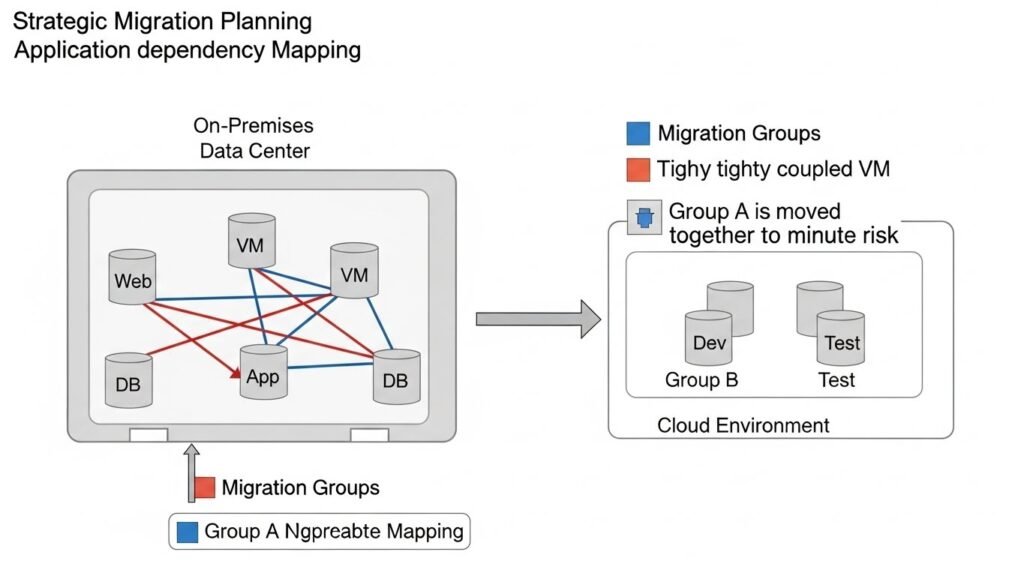
vRealize Infrastructure Navigator excelled at solving specific, high-stakes operational problems that required a deep understanding of application relationships. The mapping function acted as a foundation for multiple IT initiatives.
Migration Planning and Cloud Readiness
Cloud migrations require identifying migration groups—sets of interdependent applications that must be moved together.
- Workload Grouping: VIN automatically grouped interdependent VMs. This allowed for phased cloud migrations with minimal downtime.
- Risk Mitigation: The maps helped prevent post-migration application failures by ensuring all necessary application components were accounted for.
- Assessment: By exposing tightly coupled legacy components and their network flows, VIN aided in the cloud readiness assessment. This helped lower migration cost and estimated the time required more accurately.
Disaster Recovery (DR) Prioritization
A critical component of disaster recovery planning is knowing the order of recovery.
- Sequence Recovery: VIN helped sequence recovery tasks by identifying the most critical services and their dependencies.
- RTO/RPO Targets: This visual data allowed teams to set and meet realistic Recovery Time Objectives (RTO) and Recovery Point Objectives (RPO) targets. Without it, the assumption that critical services were isolated could lead to failure during a real event.
Troubleshooting and Performance Monitoring
When systems slow down, IT needs to pinpoint the cause quickly.
- Root Cause Analysis: VIN’s dependency maps provided the application context. When latency or failures were reported, administrators could visually trace the fault back to a database, application server, or network dependency.
- Integration with vROps: When integrated with vRealize Operations, VIN allowed teams to correlate performance metrics (from vROps) with application topology (from VIN). This enabled faster, more targeted troubleshooting.
Cost Optimization and Consolidation
Optimizing resources is a continuous task.
- Identification: Dependency mapping helped surface redundant or underutilized services and VMs. If a VM was running a service with no visible connections, it was a candidate for decommissioning.
- Resource Efficiency: Consolidating these services improved resource efficiency and helped justify hardware refresh cycles. This provided direct ROI by eliminating wasted licenses and compute power.
VIN’s Architectural Context and System Requirements
VIN was engineered to be an integrated and useful out-of-the-box solution within the VMware ecosystem. Its architecture reflected the centralization trend of its time.
Place in the VMware Stack
VIN was tightly linked to the rest of the vRealize family.
- It was considered a key component for observability within the vRealize Suite.
- It fed critical application dependency data into vRealize Operations Manager, which handled the performance and health monitoring.
- This allowed IT teams to manage automation, operations, and governance across data centers and private clouds.
System Integration (Legacy)
The installation process was designed to integrate cleanly with the core virtualization layer.
- VIN was deployed as a virtual appliance, typically using an OVA file (e.g., vRealize Infrastructure Navigator 5.8.7).
- Deployment involved using the vSphere Web Client to install the appliance, configuring the network settings, and providing credentials to connect to the vCenter Server.
- This connection gave VIN the necessary VM-level visibility to scan for applications.
Legacy Hardware Requirements
As a standalone virtual appliance, VIN had specific resource demands. These requirements are only relevant for understanding the tool’s historical context, as it is no longer supported.
| Component | Requirement |
| VIN Appliance | 4 GB RAM, 2 vCPUs |
| vCenter Server | Versions 5.1 U1, 5.5, or 6.0 |
| Browser | Latest versions of Chrome or Firefox |
| Licensing | Valid vRealize Infrastructure Navigator license (typically bundled with vRealize Operations Advanced or vCloud Suite) |
Challenges, Limitations, and the Evolution to Modern Solutions
Despite its success, vRealize Infrastructure Navigator had limitations that ultimately led to its deprecation. These limitations highlight the shift from static virtual environments to dynamic, ephemeral cloud-native architectures.
Functional Limitations of VIN
VIN’s agentless approach, while simplifying deployment, was inherently limited in scope.
- Scope: It had limited support for custom applications and was optimized mainly for common enterprise apps (like Microsoft SQL and Apache Tomcat). It struggled with newer cloud-native apps and highly distributed systems like Kubernetes.
- Mapping: The dependency mapping was somewhat static and primarily focused on VMware environments. It lacked the dynamic, cloud-scale monitoring required by modern infrastructure.
- Analytics: VIN provided visualization but lacked the AI-based analytics, predictive insights, and deep anomaly detection offered by modern APM tools. It focused on what was talking to what, not how well they were talking.
Challenges in Deployment and Maintenance
Even in supported environments, vRealize Infrastructure Navigator presented operational hurdles.
- Complexity at Scale: In very large environments, the sheer volume of connections could lead to sprawling and difficult-to-digest maps. Interpreting these maps required specific expertise.
- Change Management: While VIN tracked changes automatically, its data needed validation. Organizations needed to integrate VIN output into their change-control workflows to ensure accuracy. This was an administrative burden.
Migration and Modern Alternatives
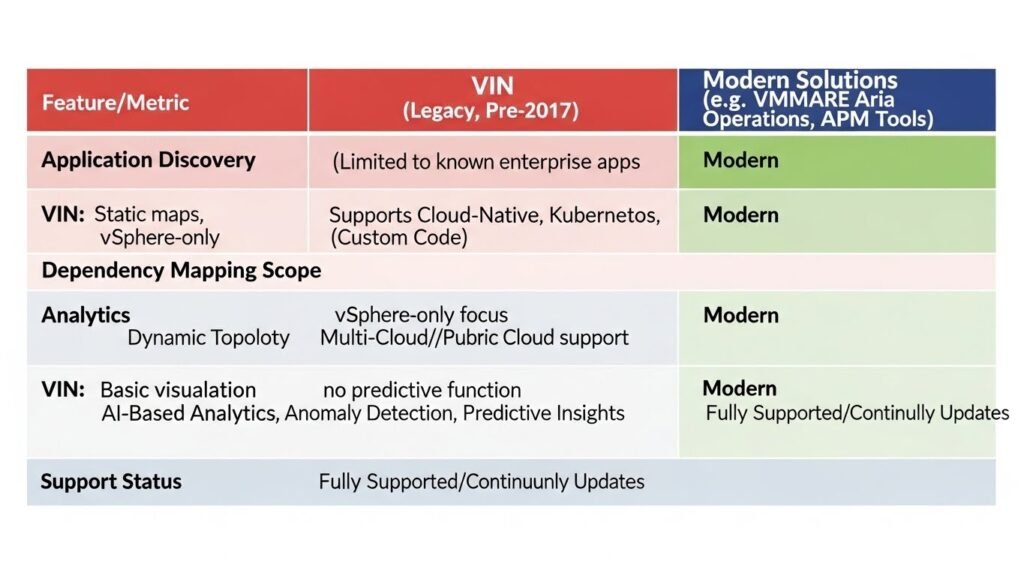
Since VIN is EOL, every organization still using it must have a migration strategy. The industry has moved toward tools that offer broader observability across multi-cloud environments.
VMware-Recommended Replacements
VMware offers superior solutions that build upon VIN’s original intent.
- VMware Aria Operations: This suite (which includes VMware Aria Operations for Applications and VMware Aria Operations for Networks) is the direct successor and preferred path. It offers advanced monitoring, AI-based analytics, and superior integration across vSphere, NSX, and vSAN.
- Service Discovery Management Pack (SDMP): To achieve VIN’s dependency mapping function, users should transition to the SDMP within vRealize Operations. This pack offers superior discovery capabilities for modern applications.
Third-Party Alternatives
Modern cloud management platform vendors offer powerful alternatives with broader reach.
- Cloud-Native APM Tools: Tools like Dynatrace and Datadog offer deep code-level tracing and monitoring across distributed systems and public cloud infrastructure.
- Infrastructure Management: Solutions like SolarWinds Virtualisation Manager offer virtualization management for both VMware and Hyper-V/Microsoft SCVMM environments.
Recommendations for Current VIN Users
Immediate action is required for VIN users to ensure continued security and compliance.
- Plan Migration: Develop a formal plan to migrate all services currently reliant on vRealize Infrastructure Navigator.
- Assess and Test: Evaluate replacement tools in a sandbox environment before deployment.
- Data Preservation: Ensure all VIN data is backed up before decommissioning the appliance.
- Training: Train staff on the new management platforms to ensure a smooth transition and proper utilization of advanced features.
Communicating VIN’s Value: Professional and Interview Strategy
Understanding vRealize Infrastructure Navigator is a valuable asset in professional conversations because it demonstrates knowledge of essential system design and failure domains. It shows you grasp the foundational concepts of observability and risk mitigation.
Importance in Professional Conversation
The technical mechanics of VIN are less important than the business value it delivered.
- Strategic Framing: Frame VIN as a decision-support system for managing complexity and reducing outage risk, not just a monitoring tool.
- Value Translation: Be able to translate technical actions (e.g., using dependency mapping) into business impacts (e.g., “reduced migration time by 30%,” “achieved continuous compliance”).
- Expertise: Discussing VIN shows an understanding of the necessity for internal workload visibility—a cornerstone of modern DevOps and infrastructure automation.
Interview Preparation Strategy
For roles in virtualization, security, or cloud migration, preparing answers related to dependency mapping is crucial.
- Know the Basics: Be able to define vRealize Infrastructure Navigator and its key capabilities concisely.
- Prepare Use-Case Stories: Have 2–3 specific scenarios (Migration, DR, Security) prepared. Use the STAR format (Situation, Task, Action, Result) to structure your answers.
- Tailor Depth: Discuss the technical mechanics and discovery logic for technical panels. Emphasize operational outcomes and ROI for management panels.
- Elevator Pitch: Practice a quick summary: “VIN automatically discovers and visualizes how apps and VMs interact, so teams can migrate, secure, and recover systems with less risk and guesswork”.
Conclusion: The Legacy of vRealize Infrastructure Navigator
vRealize Infrastructure Navigator played a key role in the evolution of virtual management. It simplified application management in VMware vSphere by providing agentless discovery and precise application dependency mapping. Its tight integration with vCenter and vRealize Operations made it an essential tool for change management and compliance.
While its limitations in handling cloud-native apps and its eventual deprecation marked the end of an era, its core principle—you can’t manage what you can’t see—remains the foundation of modern orchestration and observability tools. For organizations that need a secure, scalable, and customizable infrastructure, pairing security (like a VPN or NSX) with intelligent visibility (like VIN or its modern successors) is the only path forward. The transition to modern solutions like VMware Aria Operations is necessary to ensure operational efficiency in the ever-evolving IT landscape.
| Feature | vRealize Infrastructure Navigator (Legacy) | Modern Solutions (e.g., VMware Aria Operations) |
| Application Discovery | Limited enterprise apps, agentless | Broad support for custom and cloud-native apps, advanced discovery methods |
| Dependency Mapping | Static, near real-time maps for VMware only | Dynamic, interactive topology with real-time updates across multi-cloud environments |
| Analytics | Basic visualization, no predictive insights | Advanced analytics, anomaly detection, AI-based analytics, predictive insights |
Frequently Asked Questions (FAQs)
What is the primary function of VIN in application management?
The primary function of vRealize Infrastructure Navigator (VIN) is to provide automated application dependency mapping. It discovers applications running on virtual machines (VMs) and visualizes the connections and relationships between them in real-time. This capability gives IT teams VM-level visibility necessary to understand how the underlying infrastructure supports the applications.
How did VIN improve troubleshooting times in virtual environments?
VIN significantly improved troubleshooting times by providing app-to-app dependency maps. When an incident occurred, administrators could instantly see which systems were related to the failure, helping to narrow the investigation scope. This avoided guesswork and allowed teams to target the dependent services that needed inspection quickly.
How is VIN’s dependency mapping different from basic network monitoring?
VIN’s dependency mapping is different because it provides application context, not just network connectivity. Basic network monitoring confirms that traffic is flowing, but VIN tells you why traffic is flowing and what applications are involved. It uses deep analysis of traffic and ports to map relationships at the application layer, not just the network layer.
How did VIN assist with regulatory compliance reporting?
VIN assisted with compliance reporting by helping to generate clear reports showing dependency maps, VPN access logs, and isolation controls. This documentation was invaluable for meeting regulatory requirements for audits like PCI or HIPAA, which require detailed knowledge of data flows and access controls.
Why was the agentless approach important for VIN?
The agentless approach was important for VIN because it eliminated deployment complexity and minimized administrative overhead. By utilizing the existing VMware Tools, VIN could discover applications without requiring software installation on every VM, enabling faster deployment and reduced configuration errors.
What specific protocols or ports did VIN monitor to identify applications?
VIN monitored internal network traffic and specific port usage to identify applications. For example, it could detect a web server by traffic on port 80 or 443. It could also identify database servers by monitoring ports like 1521 (Oracle) or 1433 (Microsoft SQL Server).
How does VIN relate to the “blast radius” in IT operations?
VIN relates to the “blast radius” because it provides impact analysis. This advanced tool allows administrators to estimate the potential impact, or blast radius, of a change—such as a VM migration or patching. By identifying dependent applications, teams could avoid guessing and prevent unscheduled downtime.
Did VIN help with security segmentation efforts?
Yes, VIN helped with security segmentation efforts. Its dependency maps revealed both north-south flows (in/out) and east-west flows (internal VM-to-VM). This insight was critical for security teams to apply precise segmentation controls, often using tools like NSX, based on actual application communication needs.
What types of applications was VIN primarily optimized for?
VIN was primarily optimized for common enterprise applications, such as Microsoft SQL and Apache Tomcat. It struggled with newer paradigms, including cloud-native apps and highly distributed systems like Kubernetes.
What is the significance of the Management Pack for vRealize Infrastructure Navigator?
The Management Pack for vRealize Infrastructure Navigator was significant because it was the tool used to integrate VIN’s data into vRealize Operations Manager. This pack enhanced vROps by providing VIN Application Topology dashboards for resource usage and network performance metrics, allowing for correlated monitoring.
What is the main reason organizations needed to migrate away from VIN?
The main reason organizations needed to migrate away from VIN is its End-of-Life (EOL) status, with formal support ending in September 2017. Its functional limitations regarding cloud-native apps and lack of advanced AI-based analytics also drove the need for modern successors.
What does VIN’s dependency mapping show about “shadow IT”?
VIN’s dependency mapping helps surface shadow services or unintended service exposure. If a VM was running a service with connections that were not previously known or documented, VIN would visualize it, helping administrators identify services that were being used without proper oversight or control.
How did VIN’s policy-based grouping work?
VIN’s policy-based grouping allowed administrators to categorize VMs into logical entities, such as business services or tiers (e.g., “Finance App”). This organizational structure facilitated the application of governance policies and simplified monitoring for related sets of workloads.
Did VIN provide predictive analytics?
No, VIN did not provide predictive analytics. VIN focused on visualization and basic analysis of current relationships. It lacked the AI-based analytics and predictive insights offered by modern APM tools.
What role did VIN play in the trend of DevOps?
VIN played a role in the trend of DevOps by providing the necessary internal workload visibility. This visibility is a cornerstone of modern DevOps and infrastructure automation, as teams need precise application context to securely and reliably automate deployments, testing, and infrastructure changes.
What is the key difference between VIN (legacy) and VMware Aria Operations (modern)?
The key difference lies in scope and analytics. VIN was limited to enterprise apps and had static maps for VMware only. VMware Aria Operations offers broad support for cloud-native apps, dynamic interactive topology across multi-cloud environments, and advanced AI-based analytics.
What specific roles benefit most from understanding VIN’s principles?
Roles in virtualization administration, security, and cloud migration benefit most from understanding VIN’s principles. It demonstrates knowledge of essential system design, failure domains, and the foundational concepts of observability and risk mitigation.
What does the term “east-west flow” mean in the context of VIN?
The term “east-west flow” refers to internal VM-to-VM communication within the data center or virtual environment. VIN’s dependency maps were crucial for revealing these flows, which are often invisible to perimeter firewalls and are key to implementing micro-segmentation security.
How did VIN contribute to cost optimization?
VIN contributed to cost optimization by helping to identify redundant or underutilized services and VMs. If a service was found to have no visible connections, it became a strong candidate for decommissioning, which saved on licensing costs and compute power.
Why is having a VIN-like capability necessary when using a VPN?
Having a VIN-like capability is necessary when using a VPN because the VPN only handles security from the outside. Once data enters the infrastructure, the encryption hides the internal network behavior, creating a “secured tunnel with no visibility”. VIN provided the dependency maps to ensure visibility inside the secure tunnel.